

About the Project
The LangChain RAG Lab is a case study on Retrieval-Augmented Generation (RAG): an interactive lab where every step of the pipeline is explicit, previewable, and configurable. It lets you load documents (.txt, .md, .pdf), inspect how they are split into chunks, generate embeddings via the HuggingFace Inference API, persist vectors in PostgreSQL + pgvector, and ultimately chat with the content through an LLM with streaming responses and citation of retrieved sources.
More than a finished product, the focus is on understanding the trade-offs of a RAG system built entirely on free resources: free-tier models, low-dimensionality embeddings, and quantized LLMs. The interface deliberately exposes the parameters of each step (split, embedding, retrieval, generation) to make visible how each decision affects response quality and accuracy.
Highlights
- Chunk preview before any write — nothing is embedded or persisted until confirmed.
- Remote embeddings via HuggingFace Inference API (multilingual model, 384 dimensions) — no local model, ready for serverless.
- Similarity search (cosine distance) over an HNSW index in pgvector.
- RAG chat with streaming and source display including their similarity scores.
- Fine-grained generation control:
temperature,top_p,top_k,max_tokens,frequency/presence penalty, andsystem prompt— disabled parameters are not sent to the API. - Zod-validated environment on boot and an OOP domain layer (services + repository) with a central frozen
CONFIG.
Architecture
The project separates the interface (Next.js App Router), thin controllers (Route Handlers), and an object-oriented domain layer that concentrates all RAG logic.
Summarized flow: the document is loaded (DocumentLoader), split (DocumentProcessor), embedded by the HuggingFace Inference API (EmbeddingsService), and persisted (VectorStoreRepository). At chat time, the ChatService embeds the question, retrieves the most similar chunks, and builds the context for the LLM.
EmbeddingsService and VectorStoreRepository are lazy singletons (getInstance()): the HuggingFace client and the PGVectorStore connection pool are created once and reused across requests — avoiding a fresh connection on every call in a serverless environment, at the cost of an explicitly logged "cold start" on first creation.
Ingestion Pipeline
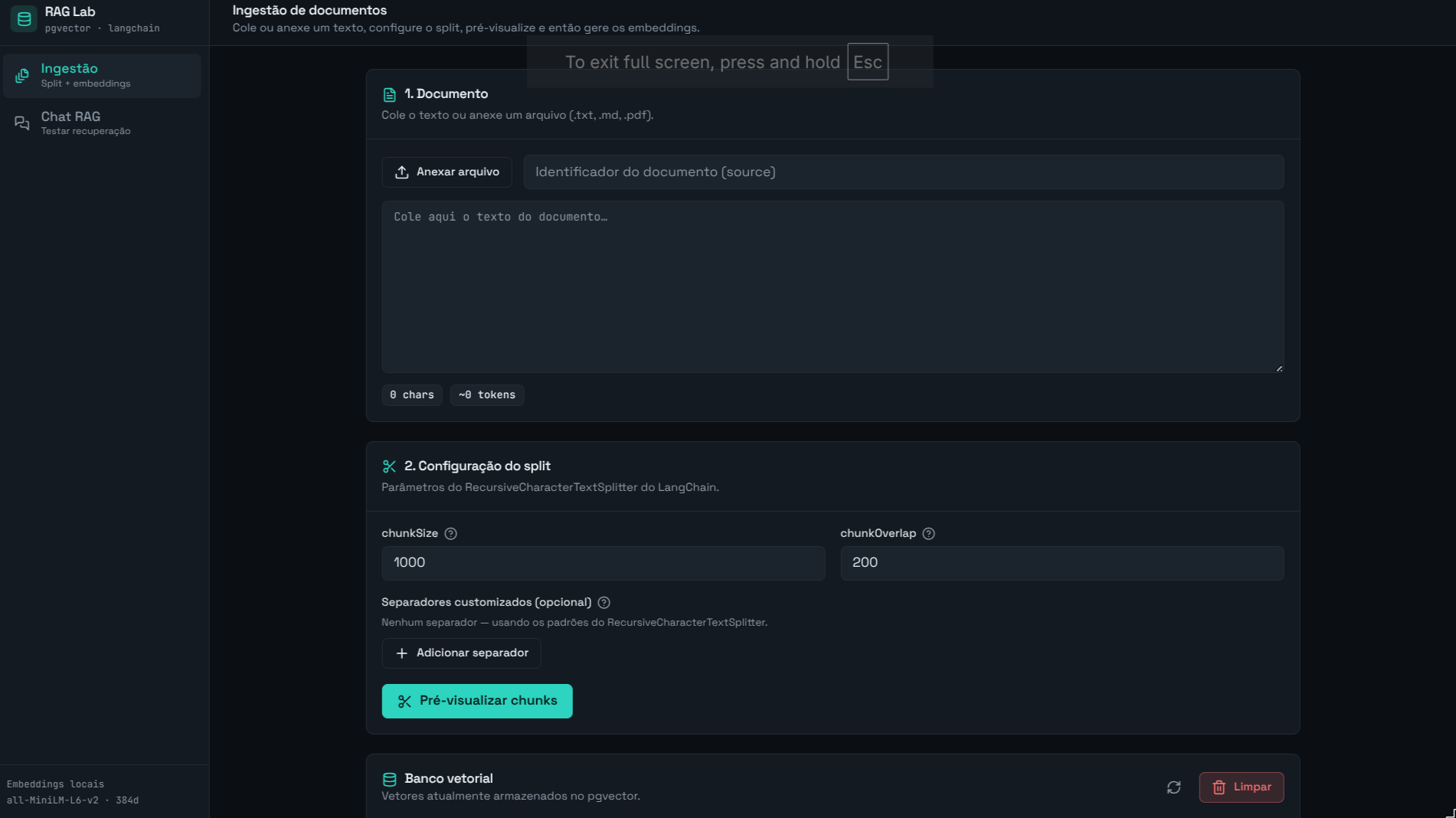
The /ingest page exposes each step of document preparation:
- Document — paste text or attach a
.txt/.md/.pdffile (PDF via LangChain'sPDFLoader, withsplitPages: false— all pages are combined into a single text before splitting; an unsupported file type throws an explicit error). - Split configuration — using
RecursiveCharacterTextSplitter, adjustchunkSize,chunkOverlap, and optional separators. - Preview chunks — shows all chunks numbered and with their sizes. Nothing is sent to the model or the database at this step.
- Confirm and generate embeddings — each chunk is embedded via the HuggingFace Inference API and saved to pgvector with metadata (
source,chunkIndex,totalChunks,chunkSize,chunkOverlap,splitter,ingestedAt). Changing the text or configuration invalidates the preview and requires previewing again.
Vector store inspector
The same /ingest page exposes a pgvector stats panel, extending the "nothing stays opaque" philosophy beyond the chunk preview:
- Total vectors stored, plus a badge per document (
source · chunk count). - A paginated listing (20 per page, with "load more") of each individual vector, filterable by document, showing: the first 8 raw embedding values (
vector_dims+ thevector::real[][1:8]slice), the full stored chunk text, and the entiremetadatajsonb. - A clear all button (
DELETE FROM embeddings, with confirmation) to wipe the vector store and restart an experiment from scratch.
RAG Chat
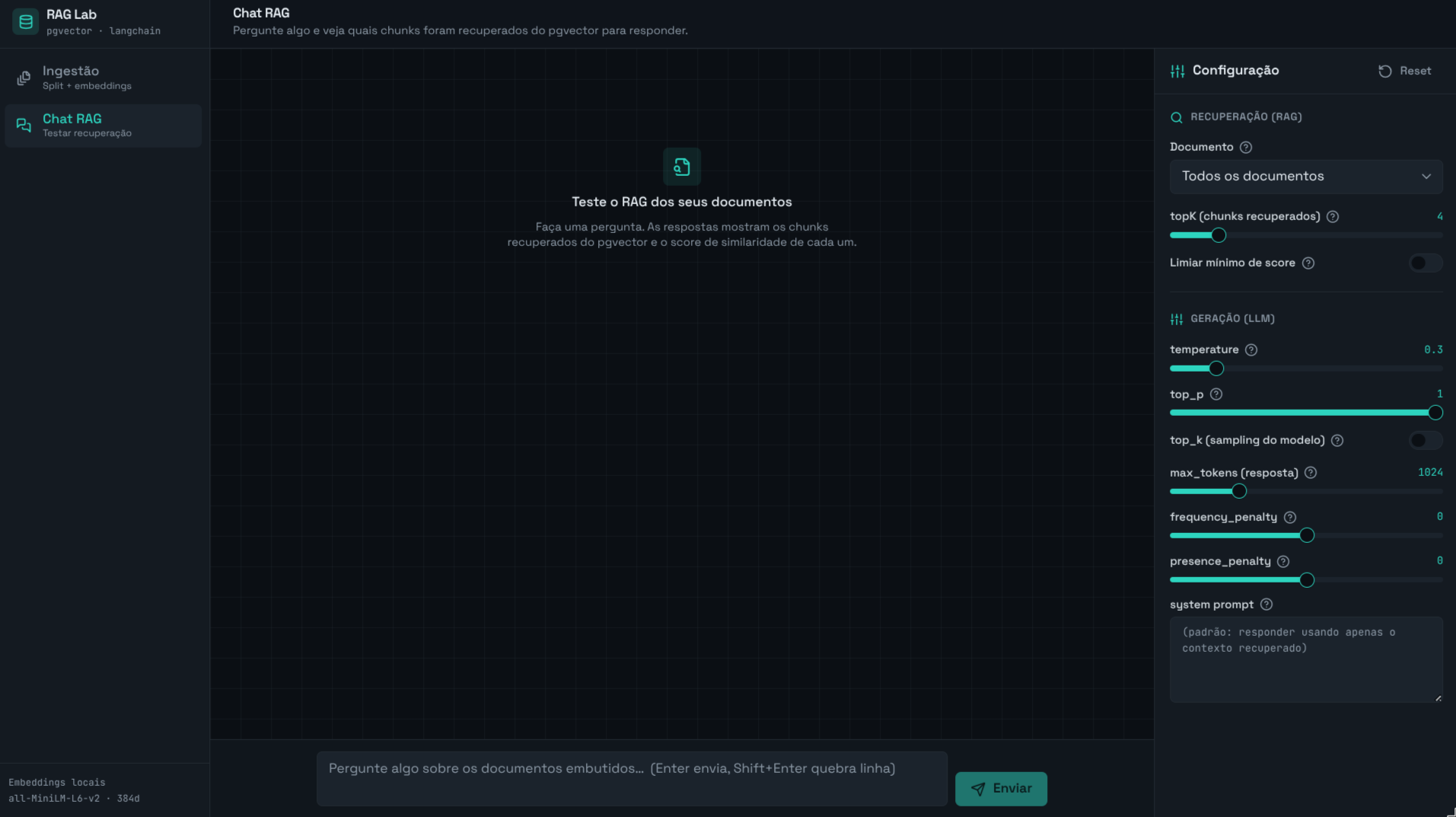
On the /chat page, the app embeds the question, retrieves the topK most similar chunks from pgvector, builds the context, and calls the LLM via OpenRouter with streaming.
- Each response displays the retrieved sources with their similarity score (cosine), the model used, and the applied parameters.
- The side panel is fully configurable and persisted in
localStorage:- Retrieval:
topKand minimum score threshold —minScoreis applied in application code, after the search (filtering results pgvector already returned), not as part of the SQL query. - Generation:
temperature,top_p,top_k(sampling — distinct from the retrievaltopK),max_tokens,frequency_penalty,presence_penalty, andsystem prompt. Sincetop_kisn't a native OpenAI parameter, it's sent viamodelKwargsand forwarded verbatim by OpenRouter to the underlying model provider.
- Retrieval:
- The prompt is structured (
promptConfig+ templates) and assembled intoSystemMessage(persona/rules) +HumanMessage(context/question), with an optional free-form system prompt override.
Structured Prompt
Instead of writing a system prompt as a loose block of text, the project treats the prompt as structured, versionable data. The configuration lives in src/lib/prompt/prompt.config.json and is validated with Zod (promptConfigSchema) on boot — if anything is malformed, the application fails at startup rather than sending a broken prompt to the LLM.
The config separates what the model should do from how the text is assembled:
{
  "task": "Answer user questions based exclusively on the retrieved documents",
  "role": "specialized assistant for querying and extracting information via RAG",
  "instructions": [
    "Use ONLY the information from the retrieved context to answer",
    "If the context is insufficient, clearly state that no answer was found",
    "Never invent facts that are not in the context",
    "When quoting a passage, reference the source number in the format [#]",
  ],
  "constraints": {
    "language": "pt-BR",
    "tone": "objective and helpful",
    "format": "natural text with source citation [#]",
  },
  "context_rules": {
    "use_only_provided_context": true,
    "indicate_if_insufficient_context": true,
  },
}
This config is injected into two templates with placeholders ({role}, {instructions}, {context}, {question}…): system.txt receives persona and rules, and human.txt receives the retrieved context and the question. buildChatPrompt renders both and returns { system, human }, which become SystemMessage + HumanMessage.
Why this matters more than a plain system prompt:
- Separation of concerns — persona/rules (stable) live in the
SystemMessage; context/question (volatile) live in theHumanMessage. Keeping instructions in the system role gives them higher priority and greater resistance to prompt injection from the user turn or from the documents themselves. - Validatable and versionable — the prompt has a schema,
metadata(version, author, tags), and a git history. Adjusting tone, language, or rules means editing a field, not rewriting a paragraph. - Consistency — every response starts from exactly the same structure (language, citation format
[#], "don't make things up" policy), rather than depending on how the prompt happened to be written that day. - Deliberate override — the chat panel still allows replacing everything with a free-form system prompt for experimentation, but the default path is the structured one.
Case Study: Choices and Trade-offs
Since the goal is learning, the project was built entirely on free resources. That's great for zero cost and for keeping the pipeline reproducible by anyone, but it comes at a price in quality — and seeing that price clearly is precisely the point of the lab.
1. Free-tier models
The chat LLM uses a :free model from OpenRouter (default: google/gemma-4-26b-a4b-it:free). Free models are generally smaller and/or more aggressively optimized than paid ones, which translates to:
- Less reasoning capacity and a higher tendency to hallucinate when the retrieved context is weak or ambiguous.
- Rate limits and queues — availability fluctuates and latency spikes during peak hours;
:freemodel IDs can even go offline (which is why the model is configurable via env). - Limited context window and throughput, restricting how many chunks can be injected into the prompt.
In a RAG system, generation quality depends equally on the model and on retrieval quality. With a weaker model, retrieval needs to be even more precise — which brings us to the second trade-off.
2. Embedding dimensionality
The embeddings use sentence-transformers/paraphrase-multilingual-MiniLM-L12-v2, a multilingual model with only 384 dimensions (versus 768, 1024, or 1536+ for larger models). The vector dimension is, in practice, the "budget" the model has for describing the meaning of a passage:
- Fewer dimensions = less semantic representational power. Nuances of meaning "collide" in the same space, and similarity search becomes less accurate — relevant passages may fall outside the
topK, and superficially similar passages may sneak in. - On the other hand, 384d is cheaper and faster: smaller vectors take up less space in pgvector, the HNSW index is lighter, and search latency drops.
- The dimension is coupled to the schema (
vector(384)): switching the embedding model to one with a different dimension requires recreating the column and re-ingesting all documents.
Choosing 384d multilingual was a conscious trade-off: good enough for Portuguese, cheap, and serverless-friendly, at the cost of retrieval precision.
3. Quantization
Reducing a model's size by changing how its weights are represented. For example, going from 16-bit to 8-bit — or even 4-bit — shrinks the model size and speeds up inference, but can impact response quality.
The idea is to reduce the numerical precision used to store (and sometimes compute) the weights, so the model occupies less memory and runs faster — at the cost of some quality loss.
Suffixes in model names indicate how many bits are used. Taking Llama-3-8B-Instruct-q4f32_1-MLC as an example:
q4→ the model's weights were stored in 4 bits.f32→ the activations (tensors/intermediate calculations during inference) stay in float32 (32 bits), while the original is typically float16._1→ an internal identifier for the quantization variant/recipe used by MLC (differences in algorithm, calibration, packing scheme, etc.).
The model becomes smaller primarily because of the 4-bit weights, while keeping activations in float32 helps preserve numerical stability and inference quality. In short, quantization is the dial that trades precision for memory and speed — and understanding it is essential for choosing, comparing, or running models locally (for example, MLC/WebLLM builds in the browser).
Trade-off summary
| Choice | Benefit | Cost |
|---|---|---|
LLM :free (OpenRouter) | Zero cost, no infrastructure | Less capability, rate limits, more hallucination |
| 384d multilingual embedding | Fast, cheap, serverless-friendly | Less precise retrieval |
| Quantization (e.g., q4) | Less memory, faster inference | Numerical precision loss |
How to mitigate (natural evolution paths for the study): upgrade to higher-dimension embeddings, increase topK with a stricter score threshold, improve chunking (size/overlap by document type), add re-ranking, and when the budget allows, replace the :free LLM with a paid model or a less quantized local one.
Technologies Used
Framework
- Next.js 15 — React framework with App Router
- React 19 — UI library
- TypeScript — static typing throughout the project
RAG Orchestration
- LangChain (
@langchain/core,@langchain/community,@langchain/textsplitters,@langchain/openai) — splitters, loaders, and vector store integration - HuggingFace Inference API — embeddings using the
sentence-transformers/paraphrase-multilingual-MiniLM-L12-v2model (384 dimensions) - OpenRouter — chat LLM (configurable
:freemodel) with streaming responses
Database
- PostgreSQL 16 — primary persistence
- pgvector — vector storage with HNSW index and cosine distance
- Supabase — vector database in production (Transaction pooler)
Frontend
- Tailwind CSS — utility-first styling
- shadcn/ui — Radix UI-based components
- React Hook Form — form management
- React Markdown (
react-markdown+remark-gfm) — response rendering - Zod — schema validation (routes + environment variables)
Infrastructure
- Docker — PostgreSQL + pgvector locally in development
- Vercel + Supabase — application and vector database deployment in production
Technical Notes
- Displayed similarity =
1 - cosine_distancefrom pgvector (0..1, higher = more similar). serverExternalPackagesinnext.config.mjspreventspdf-parseandpgfrom being bundled into the server bundle;outputFileTracingIncludesensures prompt files (read viafs) are included in the Vercel function.- The vector dimension (
384) is coupled to the embedding model; switching models requires re-ingesting all documents. - Every environment variable is validated with Zod on boot (
src/lib/env.ts) — if anything is missing or invalid, the application fails at startup with a clear message. - pgvector indexes. The
embeddingstable keeps anhnsw (vector vector_cosine_ops)index for similarity search plus a separate index onmetadata->>'source', used when chat or the inspector filter by a specific document. - Streaming protocol. The
/api/chatresponse body is<metadata JSON><delimiter>__ANSWER__<answer tokens...>; if generation fails mid-stream, a second delimiter (__ERROR__) is appended with the error message — the client can always tell metadata, answer text, and a late failure apart within the same response body.