
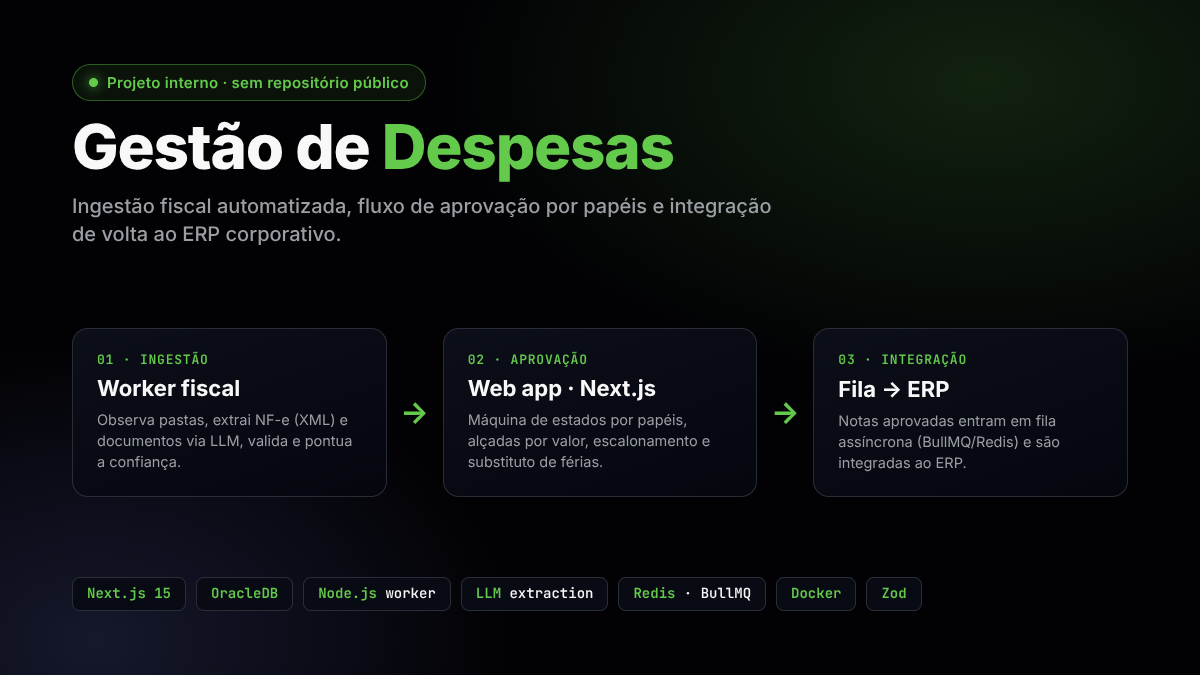

About the Project
Gestão de Despesas is the internal web application of a retail company for managing non-resale purchase expenses — everything the company buys to operate (services, materials, maintenance, marketing, IT…) that doesn't go on the shelf. Built on Next.js 15 (App Router) with React 19, it receives invoices already extracted and persisted by a dedicated ingestion worker (see the Gestão de Despesas — Ingestor post), routes each one through an eight-role approval workflow, applies tax and authority-level rules, and integrates the result back into the corporate ERP.
⚠️ Internal project — no public link. Because this is a corporate system handling real tax and financial data, there is no public URL or GitHub repository available. This post describes the architecture, business rules, and key challenges of the web application in an anonymized way — without exposing sensitive data, internal addresses, proprietary system names, or credentials.
The Problem
Before the system existed, non-resale purchase expenses arrived in a fragmented way — invoices sent by email or dropped into shared folders by each cost center (accounting, marketing, HR, IT, maintenance, procurement). From there, the approval process was manual and brittle:
- No traceability: there was no record of who approved what, when, or for how much.
- No consistent approval authority: approvals outside a manager's responsibility limit went unnoticed.
- Manual ERP entry: someone would re-read the invoice and retype the data into the ERP — slow and error-prone.
- Tax complexity: calculations like DIFAL (the ICMS interstate tax differential) required manual lookup and separate calculation.
The application's goal is to close the half of the cycle that starts after the invoice is already in the database: route it through an auditable approval workflow with authority levels, apply the tax rules that require human judgment, and integrate it into the ERP without rekeying.
Architecture
A typical mutation flows as Server Action → Repository → Database (OracleDB), with Server Components as the default and 'use client' reserved for what genuinely needs browser state.
Layers
- Actions (
src/actions/) — Server Actions grouped by domain (invoices, buyers, approvers, suppliers, users…). Every sensitive action is wrapped by a handler (secureRoleAction/secureAction) that injects the authenticated user and enforces the allowed roles; form-based actions go throughsecureFormAction/validatedActionwith a Zod schema. Errors are funneled through a single handler that returns a uniform action response, and every mutation callsrevalidatePathat the end. - Repository (
src/repository/) — one module per aggregate (invoice, line item, supplier, buyer, approver, cost center, expense type…), each receiving aDatabaseinstance in its constructor. SQL lives in its own co-located files per aggregate, keeping queries close to the code that uses them. - Database (
src/database/) — a class wrapping the OracleDB connection pool, exposed as a singleton stored onglobalThisto survive hot reload in development. An existing connection can be passed in to run multiple statements within a single transaction. - Role-based routes (
src/app/(dashboard)/) — the dashboard is grouped by profile (admin, buyer, approver, accounting, tax, finance, manager, regional manager); route middleware matches the first path segment against the allowed roles, redirecting unauthenticated users to login and unauthorized users to an access-denied page.
Business Rules
The heart of the application is the state machine that governs the lifecycle of each invoice — richer than a simple "pending → approved": besides the triage states (unknown supplier, unknown expense type, invalid details) and the buyer → approver → tax → integrated cycle, there is an extended tax track for cases requiring extra review before integration (fiscal desk → check → asset registration → completed) — used when the expense type involves asset control. Terminal and integration states do not re-enter the approval workflow, an important invariant to prevent unintended reprocessing.
Approval workflow
A newly ingested invoice arrives from the database already with an automatic linking attempt (supplier, expense type, approver). From there:
- If the data is incomplete or invalid, the invoice goes to accounting for correction (e.g., unknown supplier, unknown expense type, invalid details).
- If the data is complete, it optionally moves on to buyer validation and then to the approver, who can approve, reject, or transfer the invoice to another approver.
- Once approved, it goes to the tax officer — directly to integration, or through the extended tax track if the expense type requires it — responsible for syncing with the ERP.
- Successfully synced, it reaches the terminal state.
Approval authority by amount and escalation
Each approver has a maximum amount they can approve. If an invoice's amount exceeds that limit, the approval action itself blocks the operation as a business rule before it reaches the database — the correct approver is resolved through the hierarchy, ensuring large expenses always pass through an appropriate authority level, without relying on manual discipline. A system administrator can approve on behalf of any approver as an exception path.
Vacation and substitute approver
If an approver is on vacation (with a configured period), resolving the "effective approver" at approval time automatically points to the registered substitute — the workflow never ends up without an active responsible party, even with the primary approver away.
Urgent payments
When approving an invoice, besides advancing its status, the application queues urgent-payment emails for the tax and finance teams whenever the expense meets the urgency criteria — each team gets an email with a direct link to their own screen, already filtered to urgent invoices. A failure to queue that email is logged but never reverts an approval that has already been confirmed.
DIFAL calculation
For interstate purchases, the ICMS interstate tax differential (DIFAL) applies — the difference between the interstate rate (as shown by the supplier) and the destination state's internal rate for that NCM code. The application separates three data groups per line item:
- Extracted by the ingestion worker (values, interstate rate…).
- Enriched by the tax officer (the internal rate for the destination state, which varies by NCM/state decree and is not reliable to extract automatically).
- Calculated by the application when the internal rate is filled in:
DIFAL_AMOUNT = TOTAL_VALUE × (internal_rate − interstate_rate) / (100 − internal_rate)
The calculation is "tax-inclusive" (inclusive base), per LC 190/2022. Sample effective rates: 12→17% ≈ 6.03%, 4→17% ≈ 15.66%, 4→12% ≈ 9.09%.
Audit trail
Every significant action on an invoice (approve, reject, transfer, comment, update) is recorded with author and timestamp in a per-invoice history, making it possible to reconstruct the full timeline of any expense.
Integrations
- Corporate ERP authentication — login does not use a local user database: a custom Next-Auth v5 authentication provider (JWT session) validates credentials against the corporate ERP. User roles come from this integration and determine what each user can see and do.
- Outbound integration (queue) — when an invoice is approved, it enters an integration queue (BullMQ + Redis, up to 3 attempts with exponential backoff) that sends it to the ERP API through an authenticated HTTP client (an in-memory cached access token, refreshed on demand). Queue producers (Server Actions, jobs) use a Redis connection separate from the worker's: it fails fast instead of blocking the user's action if Redis is unavailable, rather than piling up commands waiting to reconnect. Tracking statuses (
pending,integrating,integrated,failed) are visible in the UI. - NF-e XML → PDF conversion — a PHP sidecar service, in its own container, converts the NF-e XML to PDF for viewing, keeping this specific dependency out of the main process.
Background Processes
Running only in the Node runtime (never on the edge), initialized once at process bootstrap:
- node-cron — four scheduled jobs: reprocess pending invoices every 5 minutes (attempting to link supplier/expense type/approver), promote future-dated entries that have matured daily at 3am, notify approvers with a daily pending-items digest on weekdays at 8am, and — hourly during business hours on weekdays — chase whoever is holding up an urgent invoice at its current stage (approver, fiscal, or finance), with a minimum cooldown between reminders and a daily cap stored in Redis to avoid turning into spam.
- BullMQ workers — the ERP integration queue and a separate email queue (approvals, urgent payments), both shut down gracefully on
SIGTERM/SIGINT.
Key Challenges
- Approval authority and escalation without manual bottlenecks. Blocking approval when the amount exceeds the approver's limit — and automatically resolving the correct approver through the hierarchy — avoids both excess autonomy and dependence on someone remembering to escalate manually.
- Extended tax track as the exception, not the rule. Not every approved invoice needs extra asset-registration review; designing that track as an optional detour from the main state machine, rather than a parallel workflow, kept the core approval logic simple.
- Queue resilience under infrastructure failure. Separating the Redis connection used by producers (Server Actions, jobs) from the one used by the consumer (worker) — with aggressive timeouts and no offline queue on the producer side — prevents Redis instability from blocking a user's action in the browser.
- The tax nuance of DIFAL. The internal rate varies by NCM and by state decree — something that cannot be automated safely. The solution was a hybrid design: the ingestion worker extracts what's safe, the application calculates the result, and the tax officer explicitly fills in the one point that requires a specialist (internal rate).
- Role enforcement at the action boundary. Rather than scattering permission checks throughout the UI, each Server Action is wrapped by a handler that validates the role and injects the authenticated user — authorization lives in one place, and parameterized SQL in the repositories mitigates injection.
Technologies Used
- Next.js 15 (App Router) + React 19 + TypeScript — Server Components and Server Actions.
- Tailwind CSS + accessible components (Radix/shadcn) — responsive UI.
- Next-Auth v5 — authentication integrated with the corporate ERP (JWT session).
- Zod — schema validation on all inputs.
- OracleDB — transactional and reference database (connection pool, parameterized binds).
- Redis + BullMQ — async queues (ERP integration and email).
- node-cron — scheduled tasks.
- Docker — packaging for the application and the PHP PDF-conversion sidecar.
Technical Notes
- Clean separation from the ingestion worker. The web application never reads files or calls LLMs to extract invoice data — it receives records that are already validated and persisted, and focuses entirely on approval, the tax rules that require human judgment, and outbound integration. Extraction and ingestion details live in the dedicated worker post.
- Role enforcement at the action boundary. Rather than scattering permission checks throughout the UI, each Server Action is wrapped by a handler that validates the role and injects the authenticated user.
- Co-located, parameterized SQL. Queries live in their own files per aggregate and always use binds, mitigating SQL injection.
- Anonymization. Company names, proprietary system names, network addresses, database schema, and internal URLs have been deliberately omitted from this post — the focus is the engineering, not the corporate data.